Virtual Showrooms: How to Build an Interactive 3D Showroom Online

A virtual showroom is a browser-based, interactive version of a physical store that shoppers explore in 360°, clicking products for prices, specs, and video without leaving the scene. You build one by photographing your real space or uploading a 3D model, then layering on hotspots and shoppable links, no code required.
For a long time, a showroom meant square footage, foot traffic, and a lease. If a customer wanted to see your products, they had to drive over and walk in.
That has changed. Today, your best showroom can be a link. It is open at 2pm and 2am, it works for a customer across town or across an ocean, and it never closes for the holidays.
This is the virtual showroom, and it is one of the most practical ways to use interactive 360° content for sales. Here is what one actually is, why brands are building them, and how to make your own.
What Is a Virtual Showroom?
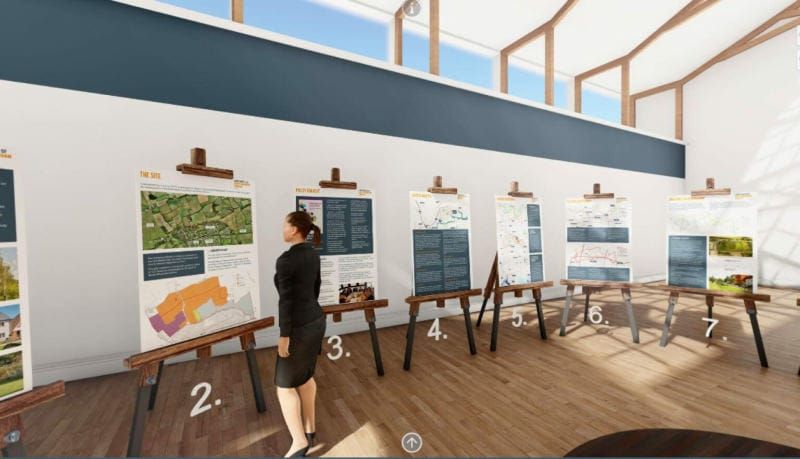
A virtual showroom is an interactive, online version of a physical showroom that customers can explore from any browser. Instead of scrolling a grid of product photos, visitors move through a space, look around in 360°, click on products for details, watch a video, or buy on the spot.
Think of it as the middle ground between a flat product page and an in-person visit. It has the context and atmosphere of being there, with the convenience and reach of the web. SeekBeak is a no-code platform that has powered interactive 360° experiences since 2014, and it builds virtual showrooms from real photos of your space rather than 3D models you have to design from scratch. There is no game engine to learn and no code to write, and because everything runs in the browser, there is nothing for you or your customer to download or install.
Why Brands Are Building Virtual Showrooms
A few reasons keep coming up:
- It is always open. Your showroom keeps selling outside business hours and in every time zone.
- It reaches people you could never fit in the room. A buyer on the other side of the world can walk through your space without booking a flight.
- It costs a fraction of physical retail space. No extra square footage, no second location, no staffing a room that sits empty half the day.
- It is measurable. Unlike a physical showroom, you can see exactly which products drew attention and which got skipped.
Put together, that adds up to a sales tool that does more, costs less, and actually tells you what is working.
More Than a Product Page, or a Basic 360° Spin
It helps to be clear about what a virtual showroom is not. A standard product page is passive: a few photos, a block of text, and a buy button. A basic 360° spin, the kind you might add to a Google listing or get from a simple spin viewer, is a step up, but it still only lets people look. They can turn the view around, and that is where it ends. If a Google listing is your current setup, it is worth seeing why a Google Street View alternative can do so much more with the same images.
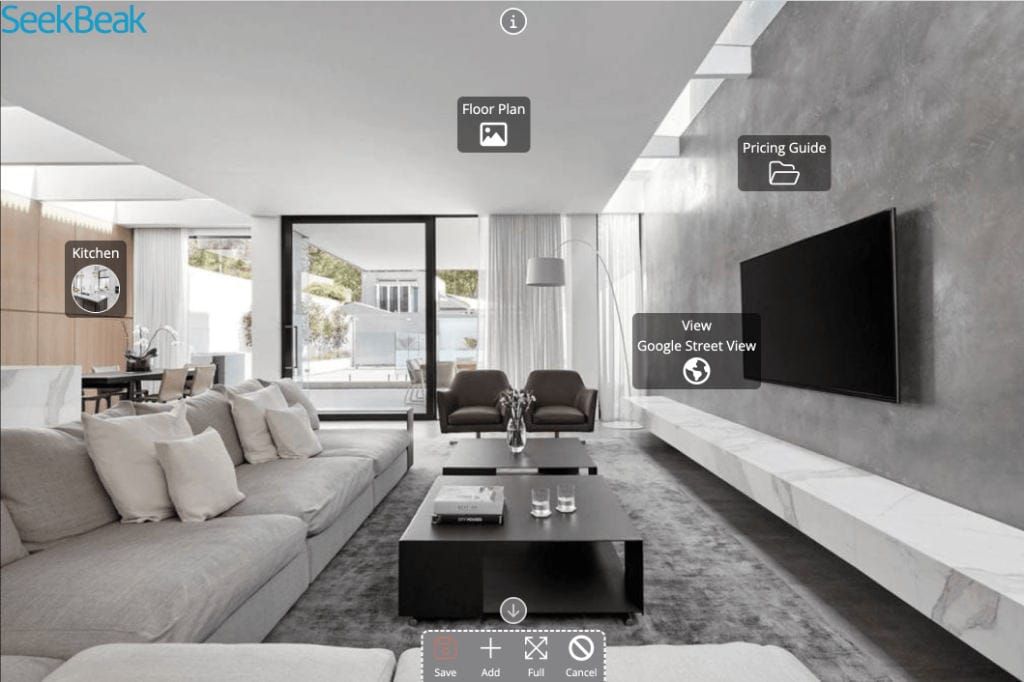
A real virtual showroom is built for interaction. Visitors can click a product to pull up pricing and specs, watch a short demo without leaving the scene, open a PDF lookbook, move between rooms or collections, and add something to their cart right there. The difference is the same as the difference between a brochure and a conversation. One talks at your customer, the other responds to them. That interactivity is exactly what turns browsing into buying, and it is the part a flat gallery can never replicate.
360° Photos, a 3D Model You Can Walk Around, or Both
There is no single right way to build a virtual showroom. The best approach depends on whether your space already exists and how much you want to construct. You have three options:
- 360° photos of a real space. If you already have a showroom, store, or stand, photograph it with a 360° camera and link the scenes together so visitors can move from one area to the next, exactly like walking the floor in person.
- A 3D model people can walk around. No physical space, or want to show something that does not exist yet? Upload a 3D model of a showroom and let visitors explore it with first-person walking or orbit controls, with collision detection so they move through it naturally. This is ideal for concept stores, product launches, trade-show stands, or a layout you are still planning.
- A combination of both. Mix 360° photos of your real space with 3D models of individual products customers can spin and inspect, or drop a built 3D area into a photographed tour. SeekBeak lets 360° images, flat images, 3D models, and even photorealistic Gaussian Splat scans live in the same experience, so you can use whatever tells each part of the story best.
Many brands start with 360° photos because they are the fastest to produce, then layer in 3D product models or a built 3D space where customers want a closer, more hands-on look.
What to Put Inside Your Virtual Showroom
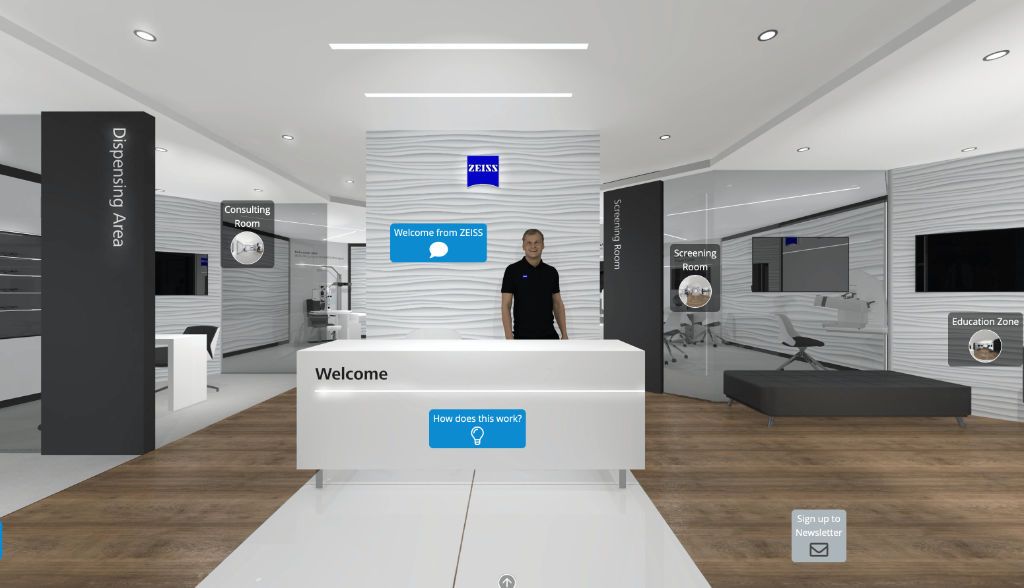
If a blank showroom feels intimidating, here are the kinds of content that earn their place in one:
- Product hotspots with pricing, specs, and a buy or enquire button right on the item.
- Short video demos or how-it-works clips attached to the product they explain.
- Downloadable PDFs such as spec sheets, lookbooks, catalogues, or warranty details.
- Finish and option choices, like fabric swatches or colourways, shown with interactive content.
- A contact or booking hotspot so a serious buyer can reach a real person in one click.
- Links to related products or collections to keep people exploring instead of leaving.
You do not need all of it on day one. Start with your best sellers and the questions buyers ask most often, then build out from there as you see what people actually click.
Who Uses Virtual Showrooms?
Plenty of industries, but a few get outsized value:
- Retail and ecommerce brands giving online shoppers a richer, more confident buying experience than a product grid can.
- Manufacturers and B2B sellers showing large or complex products that are difficult, or expensive, to ship to a sales meeting.
- Furniture, automotive, and home goods companies letting buyers explore finishes, configurations, and details up close before they commit.
- Marketing and creative teams building interactive retail experiences and product launches that stand out from a flat campaign.
Your Showroom, Open to Everyone
A virtual showroom takes the best parts of an in-person visit, the context, the atmosphere, the ability to really see a product, and makes them available to anyone with a link. It is affordable, measurable, and it never closes. If you have products worth seeing, they are worth showing properly.
A showroom is just one way to put interactive 360° content to work. It is worth understanding the bigger picture of how a virtual tour benefits your business, and if you are still comparing tools, how to choose the best virtual tour platform for the job.
Key Takeaways
- A virtual showroom is an interactive, browser-based version of a physical showroom that customers explore in 360°.
- It does far more than a product page or a basic 360° spin, letting visitors click, watch, download, and buy inside the scene.
- It stays open 24/7, reaches a global audience, and costs far less than physical retail space.
- With SeekBeak you can build one with no code, using hotspots, Custom Overlays, 3D models, and shoppable links to Shopify, Amazon, or eBay.
- Built-in analytics show which products draw attention, so you can merchandise smarter over time.
How to Build a Virtual Showroom With SeekBeak
You do not need a developer or a production crew. SeekBeak's no-code editor is used by everyone from solo brands to Fortune 50 teams, so most of the work is simply uploading your content and adding interactivity. Here is the workflow.
1. Capture and upload your space
Use whatever you have, a 360° camera, a DSLR, or even your phone. Upload your images, flat or 360°, and link several scenes together if you want visitors to walk from one area or collection to the next. If you sell physical products, you can also bring in interactive 3D models so customers can spin and inspect individual items from every angle, the way they would pick something up in store.
2. Add interactivity with hotspots and overlays
This is the step that turns a pretty image into a showroom. Drop hotspots onto products to reveal specs, photos, and videos, and use them to attach documents or link out to a full product page. Then use Custom Overlays to add persistent branded navigation, a splash screen, and information panels that stay on screen as people explore, so your showroom feels designed rather than improvised.
3. Make it shoppable
A showroom should let people buy, not just browse. SeekBeak's Shop hotspots connect straight to your Shopify, Amazon, or eBay listings, so a visitor can go from looking to purchasing without ever leaving the experience. If you want the full walkthrough, here is how to add ecommerce to your 360° tours and how the buy-now and shopping cart functionality works in practice.
4. Brand it as your own
Apply your colors and logo so the showroom looks like part of your site, not a third-party tool bolted on. And if you want a completely seamless look, you can white-label the whole thing and host it on your own custom domain, so your customers see your brand from the first click to the last.
5. Embed, share, and track
Publish your showroom and embed it on your website with a simple snippet, share it by direct link, post it to social, or print a QR code for your packaging, catalogue, or trade show booth. Then watch the analytics and heatmaps to see which products pull the most attention and where people drop off, and use that to rearrange your showroom and merchandise smarter over time. A physical showroom can never tell you that.
Frequently Asked Questions
A virtual showroom is an interactive, online version of a physical showroom that customers explore in 360° from any browser. Instead of scrolling a grid of product photos, visitors move through the space, click products for pricing and specs, watch demos, and buy without leaving the scene. It sits between a flat product page and an in-person visit, giving the context of being there with the reach of the web.
A virtual showroom costs a fraction of physical retail space, because there is no extra square footage, no second location, and no staff needed to keep a room open. It also stays open around the clock across every time zone, so it keeps selling outside business hours. With a no-code platform like SeekBeak you can build one using the camera you already own.
You can use either, or both. If your space already exists, photographing it with a 360° camera and linking the scenes together is the fastest route. If you want to show something that does not exist yet, you can upload a walkable 3D model, and SeekBeak lets 360° photos, flat images, 3D models, and Gaussian Splat scans live in the same experience.
Yes. SeekBeak's Shop hotspots connect directly to your Shopify, Amazon, or eBay listings, so a visitor can go from looking to buying without leaving the tour. You can place these shoppable hotspots on products anywhere in the scene alongside specs, videos, and documents.
Build a Virtual Showroom Your Customers Can Actually Explore
Start free and turn your products into an interactive, shoppable showroom that is open around the clock.