SeekBeak Referral Program. Make Money by Referring Your Friends!
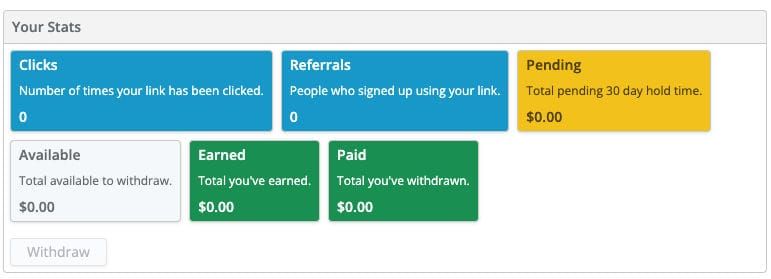
Did you know that SeekBeak has a referral program? If you've never taken a dive into the Account Settings area, you may have missed it. Well, miss it no more! Now you know that if you tell your friends about SeekBeak, they will get a free month on any plan, and you'll receive a recurring 10% of their invoices, in CASH! How it works:
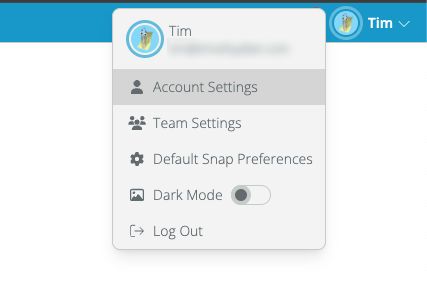
Go to your Account Settings via the menu at the top of the screen.
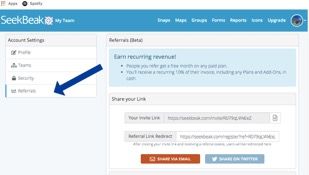
Click on the Referrals tab to view all your referral information and stats.
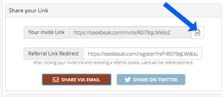
Copy your Invite Link by pressing the clipboard icon, or use the Share via Email/Twitter buttons below.
Then the link will be saved to your clipboard - you just need to paste it into an email, text message, social media message, etc.
Send your link to your network via email, text message, or social media message. Please be mindful of spamming, nobody likes spam.
After clicking your link, your friend is redirected to the SeekBeak website to signup, Pro-tip: You can also use the built-in Referral Link Redirect which can send your friend to your own custom landing page/funnel if necessary.
Your friend then receives a free month's trial on any plan and you receive a recurring 10% on all their invoices!
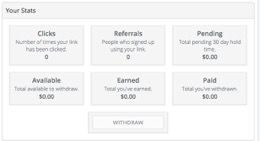
You can check your referral stats under Account Settings -> Referrals at any time - see who signed up and how much $ you are earning. Once you have an available balance of $50 or more, you can withdraw your money.
Happy referring!