Simple Ways to Maximize Virtual Tour ROI

Because a virtual tour shouldn’t just look good, it should work hard too.
So, you’ve launched a beautiful virtual tour. You’re thrilled, your client’s thrilled. The visuals are on point. You pat yourself on the back and call it a day.
But hold on.
That sleek experience you’ve built? It’s not just digital eye candy. It’s actually a revenue generating, lead-converting, insight-gathering machine.
Or at least… it can be.
If you need to prove virtual tour ROI to clients, capture leads inside a 360° experience, or track exactly how visitors engage with your content, you’re in the right place. SeekBeak is a browser-based virtual tour platform with built-in analytics, heatmaps, lead capture forms, and custom JavaScript tracking, all hosted on SeekBeak’s own domain so ad-blockers don’t eat your data. Whether you’re a solo creative, a marketing agency, or a municipality showing off your latest urban plan, these tips will help you squeeze every drop of virtual tour ROI from your subscription.
Track Virtual Tour Analytics to Prove ROI
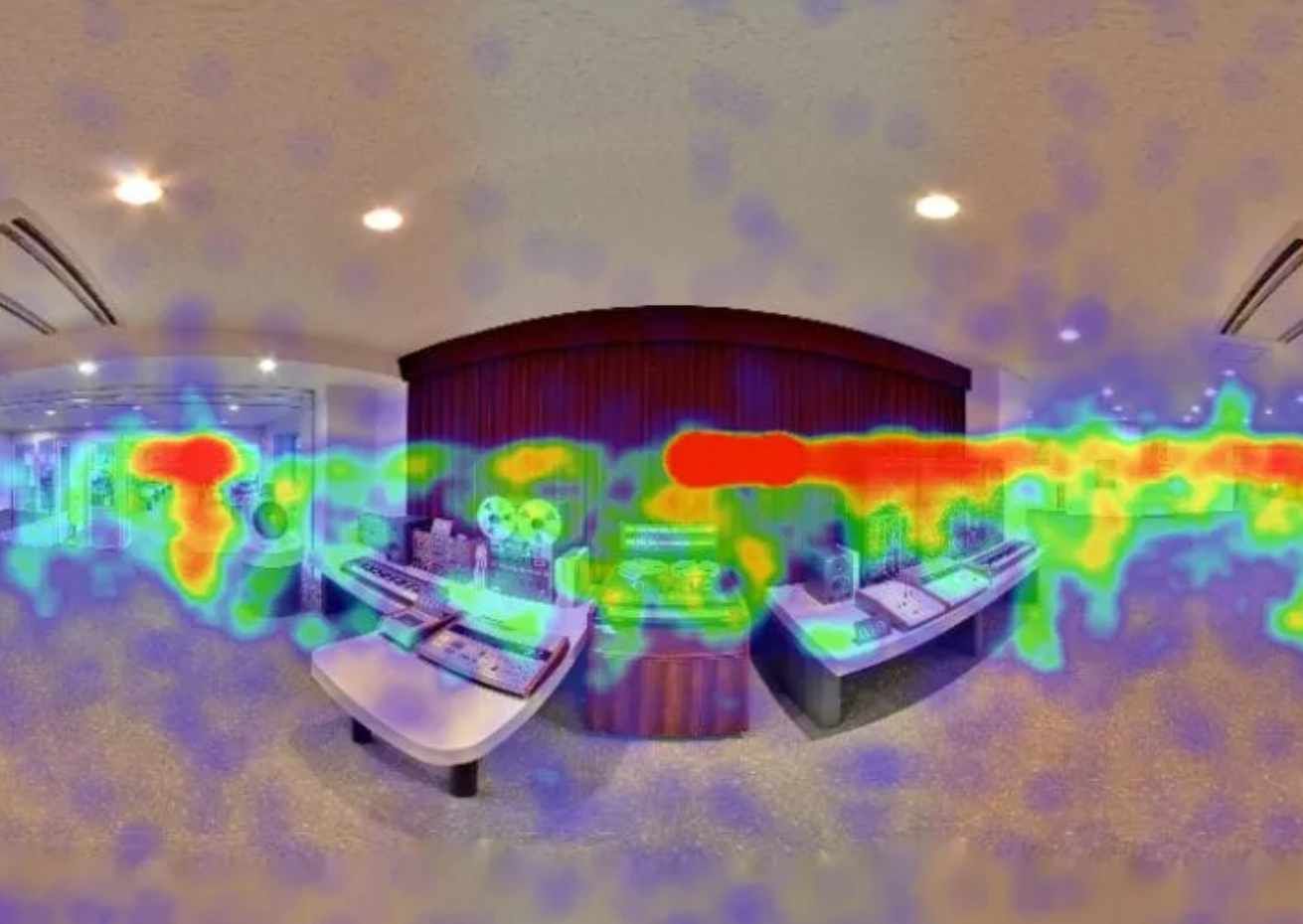
SeekBeak Heat Map Report
If you’re not checking your virtual tour analytics, you’re flying blind. Unlike relying solely on Google Analytics (which ad-blockers can silently gut), SeekBeak’s built-in reporting is hosted on SeekBeak’s own domain, so you get real engagement data. Here’s what you can track:
- Snap View count tells you how many people visited each scene.
- The Heatmap Report shows exactly where viewers looked inside a 360° image, letting you optimize placement of key content and calls to action.
- The Hotspot Click Report reveals which interactive elements people actually tap.
- Active Duration tracks how long visitors spend on each scene, so you can spot drop-off points.
- The Traffic Source report shows where your visitors come from (and which campaigns are working).
You can schedule automated email reports or export data to CSV for your own tools. But what do you do with all that virtual tour tracking data?
- Optimize your layout. If people aren’t making it past the lobby, make it more enticing or rearrange your scene flow.
- Justify ROI to clients. Those printable charts and PDF group summaries are gold. Include them in monthly or quarterly reports to demonstrate value, and even charge a premium for analytics insights.
- Refine your storytelling. Focus on what drives the most virtual tour engagement, and cut what doesn’t.
For more on reporting, watch our tutorial!
Turn Visitors into Leads with In-Tour Forms
People are already immersed in your content. Rather than sending them to a separate landing page (where they might bounce), SeekBeak’s built-in Form Designer captures leads directly inside the virtual tour, with real-time email notifications and CRM-ready CSV exports.
Virtual tour lead generation gets a lot easier when the form lives right inside the experience. Here’s what you can do:
- Capture emails directly within the tour, with instant email notifications so you never miss a lead.
- Gather feedback (What did you love? What was missing for you?) using responsive forms that adapt from big-screen kiosks to mobile phones.
- Build scored quizzes with weighted responses for educational or qualification workflows.
- Export all responses to CSV for spreadsheet processing or CRM import.
Ideas on where to place them:
- After your CTA Hotspot (i.e., "Want more info? Fill out this quick form!").
- At key decision points (i.e., pricing selection, booking area, feature explainer).
- As part of an interactive quiz or survey embedded into your tour.
Watch our video tutorial on Custom Forms for more info.
Extend Virtual Tour Tracking with Custom JavaScript
Okay, so this one’s for the slightly more advanced crowd on plans that support it… but it can be game changing.
You can embed custom JavaScript into your SeekBeak tour in multiple ways: executed once when a viewer first loads your content, or as an action triggered by any event. This flexibility allows you to:
- Fire off events or data to any analytics program, i.e. Google Tag Manager, HubSpot.
- Use trackers from other providers, i.e. Meta Pixel.
- Embed AI chatbots, use Shopify shopping carts, or include any embeddable widgets from external providers.
- Push data to your CRM or CMS.
- Trigger custom notifications when a user clicks on something specific like a “contact us” button.
- Do anything else that you can do with JavaScript on a webpage!
If you also want to track 360 photo traffic with Google Analytics, SeekBeak supports that integration alongside its own built-in reporting.
Technical TipAsk your developer team to help you set up events that match your KPIs. The value of this visibility can be priceless.
Resell Hosting + Add Reporting = Recurring Revenue
You’re likely paying a monthly or annual subscription for SeekBeak. And if you’re an agency, why not pass that cost along and build in a little markup?
The biggest virtual tour ROI challenge for agencies is turning one-and-done projects into a recurring revenue stream. Here’s how to make it work:
- Charge clients monthly or yearly for hosting their virtual tour. SeekBeak supports white-label branding and custom domains (like tours.yourclient.com), so clients see your agency’s brand, not ours.
- Use Sub-Teams to segregate each client’s content under one billing account, keeping everything organized.
- Add an upsell for monthly reports using SeekBeak’s built-in analytics tools (those heatmaps and engagement reports make great deliverables).
- Offer small monthly updates: seasonal content swaps, new Hotspots, refreshed calls to action. Because SeekBeak content is live-updatable (change once, published everywhere, no re-rendering or re-uploading files), these updates take minutes, not hours.
Whether you’re a large agency or a small business making a big impact with virtual tours, the subscription model works.
Bonus TipUse your reporting to showcase improvements over time and keep clients engaged. If your tour helped increase bookings by 15%, don’t be shy, let your clients know!
Get Strategic with Virtual Tour Hotspots
The heart of any interactive virtual tour built with SeekBeak is the Hotspots. They’re not just pretty markers. Each hotspot type serves a different purpose: URL hotspots link to booking pages or product demos, Embed hotspots open videos or web content in a popup, Shop hotspots connect to e-commerce platforms like Shopify, Form hotspots capture leads without leaving the tour, and Image hotspots can display slideshows or even play mapped video directly on surfaces.
What makes these especially powerful for virtual tour ROI is SeekBeak’s Actions system. Every hotspot can have multiple Actions stacked on it, each with its own trigger (On Click, Hover, On Snap Load) and optional delay. That means a single hotspot click can open a product panel, fire a tracking event to your CRM via Signal URL, and reveal a follow-up hotspot using Hotspot Visibility, all at once, no code required. You can even chain interactions with the Trigger a Hotspot action, so clicking one hotspot automatically activates another for guided selling flows or interactive walkthroughs.
- Make sure every hotspot has a purpose: to inform, convert, or entertain.
- Stack Actions to create compound interactions: show a product detail panel on click, then reveal a “Book Now” hotspot on hover, then fire a webhook to your CRM.
- Use Hotspot Visibility actions for progressive disclosure: guide visitors through content step-by-step instead of overwhelming them with everything at once.
- Test copy and positioning to see what drives the most virtual tour engagement (the Hotspot Click Report shows you exactly what’s working).
For more on designing hotspots that look great and convert, check out the hotspot design guide.
Key Takeaways: Your Virtual Tour ROI Checklist
- Track virtual tour analytics with SeekBeak’s built-in Heatmap, Hotspot Click, and Active Duration reports to see what’s working and what isn’t.
- Capture leads inside the tour using the Form Designer, with real-time email notifications and CSV export for your CRM.
- Extend tracking with custom JavaScript to fire events to Google Tag Manager, HubSpot, Meta Pixel, or any analytics tool.
- Build recurring revenue by reselling hosting with white-label branding, custom domains, and monthly analytics reports (agencies).
- Optimize your hotspots by assigning each one a clear purpose, stacking Actions for compound interactions (product reveals, CRM webhooks, guided flows), and tracking engagement with the Hotspot Click Report.
A virtual tour is a visual treat, but it’s also a lot more than that. It’s a performance tool. And when you use an interactive virtual tour platform like SeekBeak to its full potential, it becomes a lead magnet, an insights engine, and a recurring revenue generator all rolled into one.
If you need help implementing some of these ideas, reach out. We love geeking out about this stuff. And if you’re already doing something smart with your SeekBeak tour, we want to hear about it.