Skip the Slide Deck: How to Build a Virtual Sales Room That Closes Deals

A virtual sales room is an interactive, self-guided space that replaces the linear slide deck, and you build one in SeekBeak by placing clickable hotspots that hold videos, feature callouts, client proof, and built-in calls to action so buyers can explore your pitch at their own pace.
Most slide decks are about as thrilling as hotel room coffee.
Predictable. Lifeless. Forgettable.
And in sales, forgettable is fatal.
Your potential customers aren’t just scrolling through your pitch, they’re juggling Slack or Teams messages, fending off meeting fatigue, and wondering if they left the oven on. You’ve got seconds to earn their attention… and even less to keep it.
That’s why it’s time to rethink the sales deck. Don’t send over another linear PowerPoint that sounds like a Wikipedia article with “neat” animated transitions. Build them an experience. Something that makes your product or service feel like the obvious choices.
SeekBeak is a simple, yet powerful tool that within a few clicks (and some clever use of hotspots), you can turn your pitch into a Virtual Sales Room that becomes an interactive, immersive, and unforgettable sales asset that does more than “educate”... it converts.
Rethink the Sales Pitch
Here’s the problem with traditional sales presentations… they treat every prospect the same. But in reality, every deal has its own pace, pain points, and players. Some want a feature breakdown. Some want ROI proof. Some just want to see if your team’s legit.
A virtual sales room adapts to that.
Instead of walking someone through your pitch, let them walk through it themselves. When buyers explore at their own pace, they feel ownership. And ownership drives action.
What’s a Virtual Sales Room?
I mean… it’s not really called a Virtual Sales Room. We kind of made it up. But it fits. Think of a Virtual Sales Room (Or a VSR if you like acronyms) as a new way to bring your pitch to life. It’s not a PDF. It’s not a deck. It’s a space. One that feels more like a showroom than a slide show. A place where someone can explore your product or service in a way that’s virtual, intuitive, and on their own terms.
Instead of being handed a 12-slide narrative with a “Let me know if you have any questions,” imagine giving people something they can walk through. A self-guided experience with videos, feature callouts, client proof, and embedded calls to action designed to mirror a real conversion.
Nobody wants an email chain with attachments like “Deck_V3_Final_FINAL2.pdf.”
And whether you build it in SeekBeak or on the back of a napkin with some tape and hope (the former sounds better), the core idea is to let your prospects explore, not just consume.
What Goes Inside a Virtual Sales Room?
If you’re thinking, “Okay, but what would I even put in one of these things?”, we’ve got you. Here are a few ideas you could include if you built your VSR using SeekBeak’s interactive hotspots:
A Quick Video Intro
Maybe it’s your sales rep or CEO giving the 30 second elevator pitch. Maybe it’s a product walkthrough. Maybe it’s your customers saying “We had some hesitation but now we’re lifers”. Sometimes seeing a real human is what makes the difference.
Feature Callouts That Actually “Click”
If you’ve ever said “We solve [insert pain point]” on slide 4 of your deck, here is your chance to make it visual. Highlight specific features, use before-and-after visuals, or even throw in a GIF or two.
Testimonials with a Little Voice
Instead of just quoting a happy customer, embed a short audio or video clip right where it matters. Let them speak for you… literally.
Built-in Actions
Want them to book a call? Ask for pricing? Fill out a form? Make it happen right inside the experience. No extra tabs. No drop-off.
ROI Breakdowns
Embed a simple value calculator or drop in a one-pager that shows the cost vs payoff. This is where your “Why now” message lives.
Of course, what you include depends on what you’re selling and who you’re talking to. But if you’re building a sales space that’s meant to work for you, these elements are a great place to start.
No coding required. Just good ideas and a little creativity.
Who Might Find SeekBeak as a Sales Tool Useful?
This kind of interactive, virtual storytelling isn’t just for one industry or use case. It’s for anyone who’s ever thought “There has to be a better way to explain what we do”.
When you’re selling something complex, high-value, or just plain hard to explain in a flat PDF, having a more dynamic, interactive way to guide someone through your offering can be beneficial.
Here are a few places where the idea of a Virtual Sales Room could benefit:
B2B SaaS
Sales teams are building tailored spaces for each industry or persona they sell into. Instead of sending five different links (the deck, the demo, the onboarding doc, the case study…), they share one interactive room with everything organized and personalized. It’s like creating a choose-your-own-adventure pitch.
Real Estate & Development
For projects that haven’t broken ground yet or exist only as blueprints, being able to visualize the… err… vision is everything. Developers are turning static floor plans into immersive previews, pairing them with investment info, videos, and virtual tours, all inside one cohesive link.
Manufacturing & Hardware
Explaining how a machine works over email? Good luck, buddy. But walk someone through a 3D model, highlight key specs with clickable overlays, or zoom in on how components fit together. It’s especially useful when your clients are in a different city (or timezone) and site visits aren’t practical.
Of course, you don’t need to be in one of these industries to make something like this work. IF your industry has layers, if your pitch has nuance, or if your sales process could use a little more “show” and a little less “tell”, this might be worth exploring.
Think of it as a shift from static assets to living, evolving sales experiences.
So… Why Would This Work?
The psychology is simple: people remember what they experience, not what they’re told. And SeekBeak lets your sales content become an experience. Slide decks? They’re static. Passive. Linear. But with a VSR, your prospect feels in control, clicking and exploring based on their priorities. It feels like a conversation, not a lecture.
And the best part? You can track everything. Want to know if your lead clicked the pricing Hotspot five times before ghosting you? Now you know. Want to know if they watched the client testimonial all the way through? Sure.
It’s sales intelligence.
Why Spend $100k on a Physical Booth You'll Only Use For 3 Days?
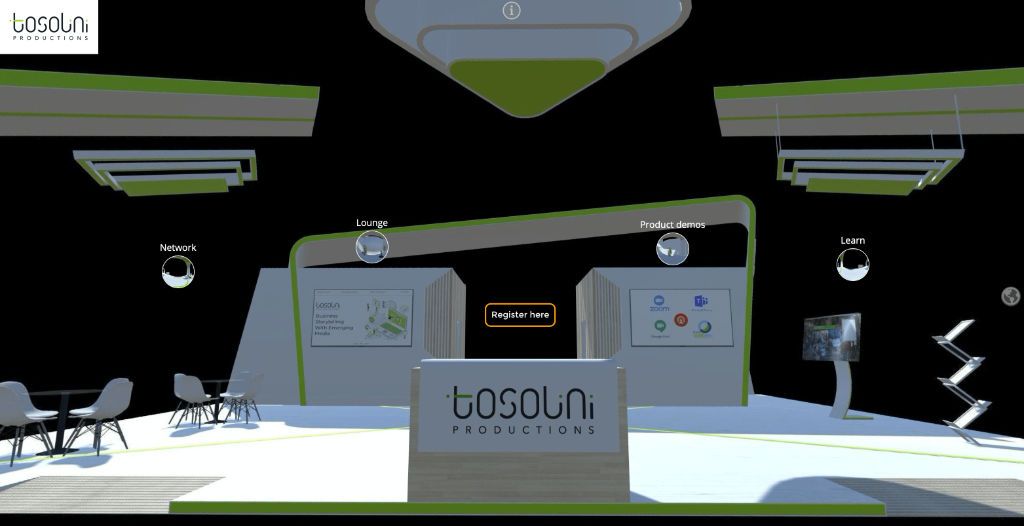
Want to make something familiar? Virtual Sales Rooms can be anything, even mimicking trade show booths you'd find in Real Life™.
Easily keep your SeekBeak virtual sales room content up to date, making changes at any time, without changing the public URL. Everyone who views it always gets the latest content.
Reimagine your Pitch Entirely?
Look… we're not saying you need to delete your slide deck and light it on fire. (Though if you do, please post on social and tag @SeekBeak)
But what if there was a better way to tell your story?
One that didn’t rely on perfectly-timed Zoom calls or hoping someone scrolls to slide 12 before zoning out. One that invited your prospects into your world visually, interactively, and on their own terms.
That’s the opportunity.
A Virtual Sales Room isn’t about throwing more content at people. It’s about building a space where the right content shows up at the right time, with the right context. It lets your team scale the human side of selling: the empathy and the clarity that turn a pitch into a real conversation.
You don’t have to rebuild your entire sales process overnight. But what would happen if you reimagined just one part of it?
Start there. Explore a new way of presenting what you do.
Frequently Asked Questions
A virtual sales room, also called a digital sales room, is an interactive, self-guided space that replaces a traditional slide deck or PDF pitch. Instead of scrolling a linear presentation, a prospect clicks through videos, feature callouts, testimonials, and calls to action at their own pace. In SeekBeak you build one using interactive hotspots placed inside a visual scene.
A strong virtual sales room usually opens with a short video intro, then layers in feature callouts, customer testimonials, ROI breakdowns, and built-in actions like booking a call or filling out a form. The exact mix depends on what you sell and who you are selling to. The goal is to let buyers explore the parts that matter to them rather than sit through everything.
No. You build a virtual sales room in SeekBeak by placing clickable hotspots on a scene, with no coding required. Everything works in the browser, so you and your prospects never install any software.
People tend to remember what they experience more than what they are told, so an interactive room sticks better than a passive slide deck. Buyers explore on their own terms, which builds a sense of ownership that drives action. SeekBeak also tracks clicks and views, so your team can see what a lead cared about and follow up with real sales intelligence.